Client project · Shopify-connected application
Whaletory — Manufacturing Inventory Platform
A manufacturing operations workspace connecting inventory visibility, stock movement reports, purchase workflows and Shopify store integrations in one application.
Industry
Manufacturing operations · Inventory software
ZyntraSoft role
Shopify application, inventory software, frontend, backend and deployment
Live example
whaletory.com
The business context
Inventory processes need structure and controlled access.
Manufacturing inventory workflows can span internal records and ecommerce channels. The project brief identifies inventory software and a Shopify application as areas of development; detailed data models, integrations and operational rules are private.
The approach
A full-stack application behind authentication.
We checked the Next.js frontend repository: dashboard, inventory summary, inventory ledger, raw material and finished product views, purchase orders and a Shopify integration route are all present. The gallery reconstructs their interface concept without claiming to show a live account or its data.
Product experience
Product features and delivery scope
Explore the features available in the live product and the technical context behind our project contribution.
Authenticated web entry
Email/password sign-in and registration routes separate public access from protected operations.
Inventory reporting & stock visibility
Frontend routes cover an inventory dashboard, inventory summary, inventory ledger, raw materials and finished products.
Shopify store connections
The frontend contains an integration route with store-domain input, verification flow and connected-store cards.
Purchasing and production workflows
Purchase-order, purchase-receipt, sales-order and recipe routes are present in the inspected frontend.
Visual evidence & design presentation
Explore the project in detail
Dashboard and ledger illustrations are reconstructed from the inspected frontend components, not captured from a client account. The third image is original public branding.
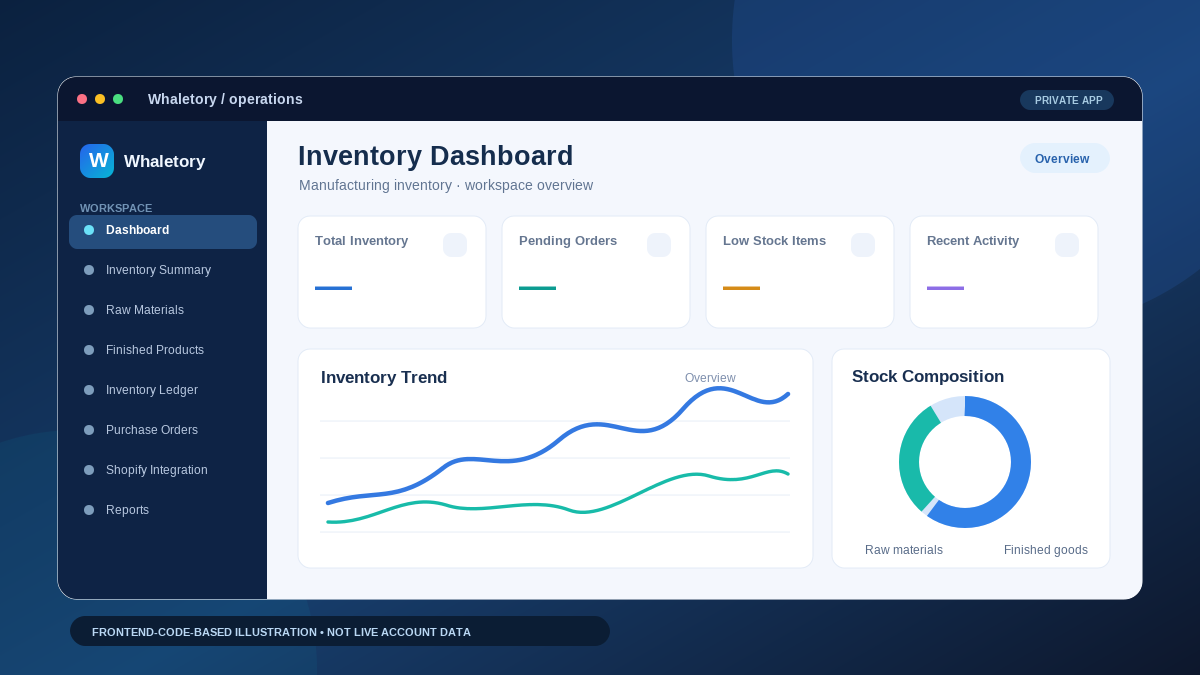
Code-based UI illustrationInventory dashboard — frontend-based visual
Editorial illustration based on the verified Inventory Dashboard component, including stock statistics, trends and inventory composition. No real customer figures or authenticated session were used.
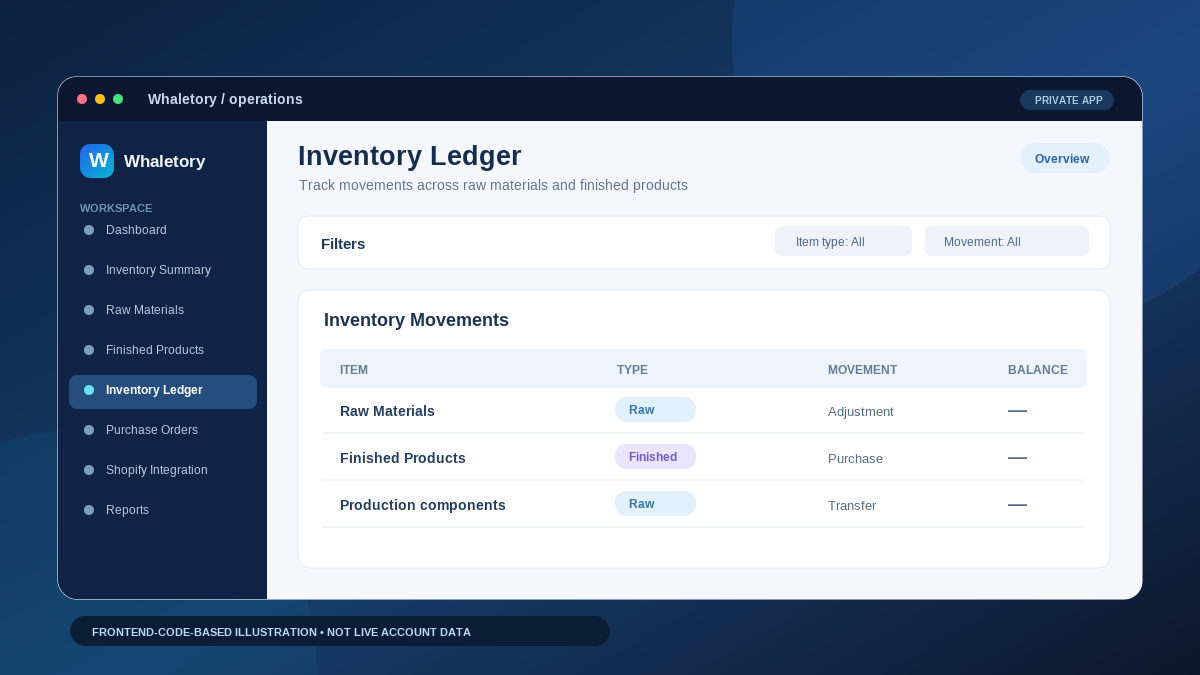 Code-based UI illustration
Inventory ledger — frontend-based visual
Illustrative view mapped to the repository's Inventory Ledger and Finished Product Inventory routes. Item labels are illustrative; quantities and records are not production data.
 Original public product media
Original Whaletory branding
Brand image from the public sign-in experience. This image, unlike the dashboard illustrations, is original public product media.
View original public source ↗Product journey
How the experience fits together
Secure entry
Access the public sign-in or account registration screens.
Inventory workspace
Review stock metrics, movement reports, material and finished-product views after authentication.
Connected commerce
Link store accounts through the Shopify integration interface; production synchronization behavior is not independently audited.
Under the hood · Engineering and architecture
Inside the manufacturing inventory platform: Next.js, reporting and Shopify integrations
Our review used the team-provided Inventory-Management-System frontend repository, rather than relying only on Whaletory’s public login page. The code includes dashboard reporting, inventory summaries, ledgers, material records, finished products, purchasing, sales orders and Shopify store-connection interfaces. The source confirms implemented frontend routes and integrations at the code level; it is not proof that every route is active in production or that any specific operational metric was achieved.
01 / Technology stack
What powers the experience
A closer look at the tools, interfaces and engineering choices behind the implementation.
Frontend application
Next.js 14 · React 18 · TypeScript
The frontend package and pages directory identify a Next.js Pages Router application. Routes include /welcome, /inventory-summary, /inventory-ledger, /finishProductInventory, /purchase-order and /shopifyIntegration.
Design system and component styling
Tailwind CSS · Responsive administrative UI
The frontend contains Tailwind configuration and responsive utility-class layouts. The main dashboard uses a light workspace with blue/indigo highlights, metric cards, tabular reporting and chart panels.
Application state and data fetching
Redux Toolkit · React Redux · API slices
The dashboard and report routes dispatch async API actions from dashboardApi-Slice and reportsApi-Slice and render API-backed state with loading/error handling.
Data visualization
Recharts · Inventory trend & composition visualizations
The welcome dashboard imports chart components from Recharts, and the inventory summary includes stock alerts, inventory value, category breakdowns and date-range filtering.
Inventory workflows
Raw materials · Finished goods · Inventory ledger · Purchase orders
The frontend has route-level modules for stock reporting, finished product inventory, movement ledgers, purchase orders, receipts, sales orders, materials and recipes. These are inspected interfaces—not published operational results.
Shopify connection workflow
Shopify store-domain entry · Code generation · Connected store listings
The Shopify integration component exposes a store domain field, a code-generation path and a connected-store list. The exact merchant permissions, deployed webhook subscriptions and reconciliation guarantees need backend and production verification.
End-to-end delivery
Frontend · Backend · Deployment
The ZyntraSoft team confirms a broader delivery role including backend implementation and deployment. We reviewed the supplied frontend source for this presentation; we do not assign a particular database or production host without corresponding deployment evidence.
02 / System architecture
How the layers connect
A functional map based on the visible product journey and team-provided scope, not a representation of undisclosed source modules or database schemas.
Web application
Next.js/React routes render the manufacturing operations workspace.
Client state
Redux slices handle dashboard state, filters and request lifecycle.
Data API
Frontend actions request inventory, reporting and store-connection data; private API implementation is not illustrated.
Operational views
Reports and pages organize raw material, finished-goods, purchasing and movement records.
Commerce boundary
Shopify integration has a dedicated connection UI; live merchant synchronization remains subject to production validation.
03 / Engineering decisions
The hard parts worth understanding
Keep manufacturing inventory understandable
Different screens are provided for raw materials, finished products, stock alerts and the inventory ledger. The illustrations reflect those source-code modules, without inserting actual stock values.
Build predictable reporting interactions
The inventory summary supports date-range requests; finished-product views have search and pagination, while ledger views include item and movement filters. API success and accuracy are not claimed from source review alone.
Connect Shopify without overclaiming sync behavior
The frontend displays a store-domain connection and connected-store workspace. OAuth scopes, inventory consistency rules, webhook handling and shop-to-warehouse data flows require an integration-level review.
04 / Delivery responsibilities
Frontend, systems and release
1 · Frontend engineering
Source-checked Next.js, React and Redux routes for inventory, reporting, purchasing and Shopify integration screens.
2 · Backend and commerce implementation
Team-confirmed contribution; underlying private services, database schema and production merchant permissions are not disclosed in these case studies.
3 · Deployment
Team-confirmed responsibility. Hosting, security settings, CI/CD providers and monitoring are not inferred from the public login interface.
05 / Integrations and APIs
Connected systems
The team-provided frontend shows Shopify connection form handling and a connected-stores listing. This demonstrates the intended merchant connection interface; it does not establish live webhook traffic, rate-limit strategy or stock-synchronization reliability.
06 / Hosting and deployment
From implementation to live product
The public product provides sign-in and registration entry. The accompanying gallery visuals are original ZyntraSoft editorial reconstructions based on source-checked frontend sections, not screen captures of logged-in production operations.
07 / Technical evidence
What we can show today
Frontend routes, libraries and screen structures were checked in a team-provided repository. The codebase includes placeholder/mock arrays in some views, so no numerical values are presented as client operational data. Production database, private inventory records, merchant credentials and business outcome metrics were not reviewed or disclosed.
Build something similar
Need a solution like this for your business?
Tell us the business process, integrations and delivery constraints. We can scope the implementation, agree on milestones and define how success will be measured.
Service area: Shopify & ecommerce